ArtifactCard
A generated document as a tangible object: title, kind, a version navigator, and the first six lines of the text itself streaming in behind a fade
Available for Svelte 5, React, and Vue 3.
Preview
<script lang="ts">
	import { onMount } from "svelte";
	import { ArtifactCard } from "fancy-ui-svelte";
	import type { StreamStatus } from "fancy-ui-svelte";

	/** The two drafts the rig cycles between — the second is a tightened edit of the first. */
	const DRAFTS = [
		"Revenue closed the quarter at 4.2M, six percent ahead of plan, and for the first time the mid-market segment outgrew enterprise. Two things drove it: the self-serve trial that shipped in May, which now accounts for a third of new logos, and a pricing change nobody expected much from. Churn is flat. The one number worth arguing about is expansion, which slipped for a second quarter running and is the reason next quarter's forecast is not simply this quarter plus growth.",
		"Revenue closed the quarter at 4.2M, six percent ahead of plan — the first time mid-market has outgrown enterprise. Two things drove it: the self-serve trial shipped in May, now a third of new logos, and a pricing change nobody expected much from. Churn is flat. Expansion is the number worth arguing about: it slipped for a second quarter running, which is why next quarter's forecast is not this quarter plus growth. Recommendation: hold the pricing, fund the expansion motion.",
	];

	/** How many characters land per tick, and how often a tick happens. */
	const CHUNK = 4;
	const TICK_MS = 22;
	/** Beat before a draft starts, and how long a finished one is left on screen. */
	const LEAD_MS = 500;
	const HOLD_MS = 2600;

	// Nothing has been written before the rig starts, so the server renders the
	// header alone and the preview region arrives with its first chunk.
	let version = $state(1);
	let status = $state<StreamStatus>("idle");
	let preview = $state("");
	let opened = $state(false);
	let copied = $state(false);

	// One timer at a time, so cleanup is a single clearTimeout and the rig can be
	// stopped mid-draft the moment a reader takes over the navigator.
	let timer: ReturnType<typeof setTimeout> | undefined;

	function stop() {
		clearTimeout(timer);
		timer = undefined;
	}

	/** Renders a draft finished and still — what a reader's click, or reduced motion, gets. */
	function settleOn(n: number) {
		stop();
		version = n;
		preview = DRAFTS[n - 1];
		status = "done";
	}

	function writeDraft(n: number) {
		version = n;
		status = "streaming";
		const full = DRAFTS[n - 1];
		let cut = CHUNK;
		preview = full.slice(0, cut);

		const tick = () => {
			cut = Math.min(full.length, cut + CHUNK);
			preview = full.slice(0, cut);
			timer = setTimeout(cut < full.length ? tick : finish, TICK_MS);
		};

		const finish = () => {
			status = "done";
			timer = setTimeout(() => writeDraft(n === DRAFTS.length ? 1 : n + 1), HOLD_MS);
		};

		timer = setTimeout(tick, LEAD_MS);
	}

	onMount(() => {
		// A document that rewrites itself forever is exactly what reduced motion is
		// asking us not to run, so it gets the finished second draft and no timer.
		if (window.matchMedia("(prefers-reduced-motion: reduce)").matches) {
			settleOn(DRAFTS.length);
			return;
		}

		writeDraft(1);
		return stop;
	});
</script>

<div class="flex w-full max-w-xl flex-col gap-2 p-6">
	<ArtifactCard
		sound
		title="Q3 revenue review"
		kind="Memo"
		{version}
		versionCount={DRAFTS.length}
		onVersionChange={settleOn}
		{status}
		{preview}
		onOpen={() => (opened = !opened)}
	>
		{#snippet actions()}
			<button
				type="button"
				class="text-muted-foreground hover:bg-muted hover:text-foreground focus-visible:ring-ring inline-flex size-6 cursor-pointer items-center justify-center rounded transition-colors focus-visible:ring-1 focus-visible:outline-none"
				aria-label={copied ? "Copied" : "Copy document"}
				onclick={() => (copied = !copied)}
			>
				{#if copied}
					<svg
						class="size-3.5"
						viewBox="0 0 24 24"
						fill="none"
						stroke="currentColor"
						stroke-width="2.5"
						stroke-linecap="round"
						stroke-linejoin="round"
						aria-hidden="true"
					>
						<path d="m5 13 4 4L19 7" />
					</svg>
				{:else}
					<svg
						class="size-3.5"
						viewBox="0 0 24 24"
						fill="none"
						stroke="currentColor"
						stroke-width="1.75"
						stroke-linecap="round"
						stroke-linejoin="round"
						aria-hidden="true"
					>
						<rect x="9" y="9" width="11" height="11" rx="2" />
						<path d="M5 15V5a2 2 0 0 1 2-2h10" />
					</svg>
				{/if}
			</button>
		{/snippet}
	</ArtifactCard>

	<p class="text-muted-foreground mt-1 text-xs">
		{opened
			? "That would open the document in a side panel — the copy button kept its own click."
			: "The card is writing itself, then rewriting itself. Click it to open, or use the arrows to settle on a draft."}
	</p>

	<!-- Still, since a document that failed is the one state the rig above never reaches. -->
	<ArtifactCard title="Q3 cohort appendix" kind="Spreadsheet" status="error" />

	<p class="text-muted-foreground text-xs">
		A failure says so in words, in a tinted footer, rather than in the border alone.
	</p>
</div>
Installation
Usage
<script lang="ts">
	import { onMount } from "svelte";
	import { ArtifactCard } from "fancy-ui-svelte";
	import type { StreamStatus } from "fancy-ui-svelte";

	/** The two drafts the rig cycles between — the second is a tightened edit of the first. */
	const DRAFTS = [
		"Revenue closed the quarter at 4.2M, six percent ahead of plan, and for the first time the mid-market segment outgrew enterprise. Two things drove it: the self-serve trial that shipped in May, which now accounts for a third of new logos, and a pricing change nobody expected much from. Churn is flat. The one number worth arguing about is expansion, which slipped for a second quarter running and is the reason next quarter's forecast is not simply this quarter plus growth.",
		"Revenue closed the quarter at 4.2M, six percent ahead of plan — the first time mid-market has outgrown enterprise. Two things drove it: the self-serve trial shipped in May, now a third of new logos, and a pricing change nobody expected much from. Churn is flat. Expansion is the number worth arguing about: it slipped for a second quarter running, which is why next quarter's forecast is not this quarter plus growth. Recommendation: hold the pricing, fund the expansion motion.",
	];

	/** How many characters land per tick, and how often a tick happens. */
	const CHUNK = 4;
	const TICK_MS = 22;
	/** Beat before a draft starts, and how long a finished one is left on screen. */
	const LEAD_MS = 500;
	const HOLD_MS = 2600;

	// Nothing has been written before the rig starts, so the server renders the
	// header alone and the preview region arrives with its first chunk.
	let version = $state(1);
	let status = $state<StreamStatus>("idle");
	let preview = $state("");
	let opened = $state(false);
	let copied = $state(false);

	// One timer at a time, so cleanup is a single clearTimeout and the rig can be
	// stopped mid-draft the moment a reader takes over the navigator.
	let timer: ReturnType<typeof setTimeout> | undefined;

	function stop() {
		clearTimeout(timer);
		timer = undefined;
	}

	/** Renders a draft finished and still — what a reader's click, or reduced motion, gets. */
	function settleOn(n: number) {
		stop();
		version = n;
		preview = DRAFTS[n - 1];
		status = "done";
	}

	function writeDraft(n: number) {
		version = n;
		status = "streaming";
		const full = DRAFTS[n - 1];
		let cut = CHUNK;
		preview = full.slice(0, cut);

		const tick = () => {
			cut = Math.min(full.length, cut + CHUNK);
			preview = full.slice(0, cut);
			timer = setTimeout(cut < full.length ? tick : finish, TICK_MS);
		};

		const finish = () => {
			status = "done";
			timer = setTimeout(() => writeDraft(n === DRAFTS.length ? 1 : n + 1), HOLD_MS);
		};

		timer = setTimeout(tick, LEAD_MS);
	}

	onMount(() => {
		// A document that rewrites itself forever is exactly what reduced motion is
		// asking us not to run, so it gets the finished second draft and no timer.
		if (window.matchMedia("(prefers-reduced-motion: reduce)").matches) {
			settleOn(DRAFTS.length);
			return;
		}

		writeDraft(1);
		return stop;
	});
</script>

<div class="flex w-full max-w-xl flex-col gap-2 p-6">
	<ArtifactCard
		sound
		title="Q3 revenue review"
		kind="Memo"
		{version}
		versionCount={DRAFTS.length}
		onVersionChange={settleOn}
		{status}
		{preview}
		onOpen={() => (opened = !opened)}
	>
		{#snippet actions()}
			<button
				type="button"
				class="text-muted-foreground hover:bg-muted hover:text-foreground focus-visible:ring-ring inline-flex size-6 cursor-pointer items-center justify-center rounded transition-colors focus-visible:ring-1 focus-visible:outline-none"
				aria-label={copied ? "Copied" : "Copy document"}
				onclick={() => (copied = !copied)}
			>
				{#if copied}
					<svg
						class="size-3.5"
						viewBox="0 0 24 24"
						fill="none"
						stroke="currentColor"
						stroke-width="2.5"
						stroke-linecap="round"
						stroke-linejoin="round"
						aria-hidden="true"
					>
						<path d="m5 13 4 4L19 7" />
					</svg>
				{:else}
					<svg
						class="size-3.5"
						viewBox="0 0 24 24"
						fill="none"
						stroke="currentColor"
						stroke-width="1.75"
						stroke-linecap="round"
						stroke-linejoin="round"
						aria-hidden="true"
					>
						<rect x="9" y="9" width="11" height="11" rx="2" />
						<path d="M5 15V5a2 2 0 0 1 2-2h10" />
					</svg>
				{/if}
			</button>
		{/snippet}
	</ArtifactCard>

	<p class="text-muted-foreground mt-1 text-xs">
		{opened
			? "That would open the document in a side panel — the copy button kept its own click."
			: "The card is writing itself, then rewriting itself. Click it to open, or use the arrows to settle on a draft."}
	</p>

	<!-- Still, since a document that failed is the one state the rig above never reaches. -->
	<ArtifactCard title="Q3 cohort appendix" kind="Spreadsheet" status="error" />

	<p class="text-muted-foreground text-xs">
		A failure says so in words, in a tinted footer, rather than in the border alone.
	</p>
</div>
Examples
Basic Usage
<script lang="ts">
	import { onMount } from "svelte";
	import { ArtifactCard } from "$lib/fancy-ui/artifact-card";
	import type { StreamStatus } from "$lib/fancy-ui";

	/** The two drafts the rig cycles between — the second is a tightened edit of the first. */
	const DRAFTS = [
		"Revenue closed the quarter at 4.2M, six percent ahead of plan, and for the first time the mid-market segment outgrew enterprise. Two things drove it: the self-serve trial that shipped in May, which now accounts for a third of new logos, and a pricing change nobody expected much from. Churn is flat. The one number worth arguing about is expansion, which slipped for a second quarter running and is the reason next quarter's forecast is not simply this quarter plus growth.",
		"Revenue closed the quarter at 4.2M, six percent ahead of plan — the first time mid-market has outgrown enterprise. Two things drove it: the self-serve trial shipped in May, now a third of new logos, and a pricing change nobody expected much from. Churn is flat. Expansion is the number worth arguing about: it slipped for a second quarter running, which is why next quarter's forecast is not this quarter plus growth. Recommendation: hold the pricing, fund the expansion motion.",
	];

	/** How many characters land per tick, and how often a tick happens. */
	const CHUNK = 4;
	const TICK_MS = 22;
	/** Beat before a draft starts, and how long a finished one is left on screen. */
	const LEAD_MS = 500;
	const HOLD_MS = 2600;

	// Nothing has been written before the rig starts, so the server renders the
	// header alone and the preview region arrives with its first chunk.
	let version = $state(1);
	let status = $state<StreamStatus>("idle");
	let preview = $state("");
	let opened = $state(false);
	let copied = $state(false);

	// One timer at a time, so cleanup is a single clearTimeout and the rig can be
	// stopped mid-draft the moment a reader takes over the navigator.
	let timer: ReturnType<typeof setTimeout> | undefined;

	function stop() {
		clearTimeout(timer);
		timer = undefined;
	}

	/** Renders a draft finished and still — what a reader's click, or reduced motion, gets. */
	function settleOn(n: number) {
		stop();
		version = n;
		preview = DRAFTS[n - 1];
		status = "done";
	}

	function writeDraft(n: number) {
		version = n;
		status = "streaming";
		const full = DRAFTS[n - 1];
		let cut = CHUNK;
		preview = full.slice(0, cut);

		const tick = () => {
			cut = Math.min(full.length, cut + CHUNK);
			preview = full.slice(0, cut);
			timer = setTimeout(cut < full.length ? tick : finish, TICK_MS);
		};

		const finish = () => {
			status = "done";
			timer = setTimeout(() => writeDraft(n === DRAFTS.length ? 1 : n + 1), HOLD_MS);
		};

		timer = setTimeout(tick, LEAD_MS);
	}

	onMount(() => {
		// A document that rewrites itself forever is exactly what reduced motion is
		// asking us not to run, so it gets the finished second draft and no timer.
		if (window.matchMedia("(prefers-reduced-motion: reduce)").matches) {
			settleOn(DRAFTS.length);
			return;
		}

		writeDraft(1);
		return stop;
	});
</script>

<div class="flex w-full max-w-xl flex-col gap-2 p-6">
	<ArtifactCard
		sound
		title="Q3 revenue review"
		kind="Memo"
		{version}
		versionCount={DRAFTS.length}
		onVersionChange={settleOn}
		{status}
		{preview}
		onOpen={() => (opened = !opened)}
	>
		{#snippet actions()}
			<button
				type="button"
				class="text-muted-foreground hover:bg-muted hover:text-foreground focus-visible:ring-ring inline-flex size-6 cursor-pointer items-center justify-center rounded transition-colors focus-visible:ring-1 focus-visible:outline-none"
				aria-label={copied ? "Copied" : "Copy document"}
				onclick={() => (copied = !copied)}
			>
				{#if copied}
					<svg
						class="size-3.5"
						viewBox="0 0 24 24"
						fill="none"
						stroke="currentColor"
						stroke-width="2.5"
						stroke-linecap="round"
						stroke-linejoin="round"
						aria-hidden="true"
					>
						<path d="m5 13 4 4L19 7" />
					</svg>
				{:else}
					<svg
						class="size-3.5"
						viewBox="0 0 24 24"
						fill="none"
						stroke="currentColor"
						stroke-width="1.75"
						stroke-linecap="round"
						stroke-linejoin="round"
						aria-hidden="true"
					>
						<rect x="9" y="9" width="11" height="11" rx="2" />
						<path d="M5 15V5a2 2 0 0 1 2-2h10" />
					</svg>
				{/if}
			</button>
		{/snippet}
	</ArtifactCard>

	<p class="text-muted-foreground mt-1 text-xs">
		{opened
			? "That would open the document in a side panel — the copy button kept its own click."
			: "The card is writing itself, then rewriting itself. Click it to open, or use the arrows to settle on a draft."}
	</p>

	<!-- Still, since a document that failed is the one state the rig above never reaches. -->
	<ArtifactCard title="Q3 cohort appendix" kind="Spreadsheet" status="error" />

	<p class="text-muted-foreground text-xs">
		A failure says so in words, in a tinted footer, rather than in the border alone.
	</p>
</div>
Props
| Prop | Type | Default | Description |
|---|---|---|---|
title * | string | - | What the document is called |
kind | string | "Document" | The kind of thing it is, on the muted line under the title |
version | number | - | Which revision is on screen, 1-based; rendered as v3 |
versionCount | number | - | How many revisions exist; with version the badge reads v3/5 |
onVersionChange | (version: number) => void | - | Asked for another revision by 1-based number, never one outside its bounds; supplying it turns the badge into a navigator |
status | "idle" | "streaming" | "done" | "error" | "done" | Where the document is in its life; streaming sweeps the top edge and trails a cursor, error grows a tinted footer |
preview | string | - | The text so far, not the latest delta; clamped to roughly six lines behind a bottom fade |
onOpen | () => void | - | Asked to open the document; supplying it makes the whole card activatable by click, Enter, or Space |
sound | boolean | false | Plays press when the document is opened and select on a version step, once the user has enabled sound |
Slots
| Slot | Description |
|---|---|
actions | Buttons for the top-right rail; each keeps its own click, without opening the card |
Links
Related components
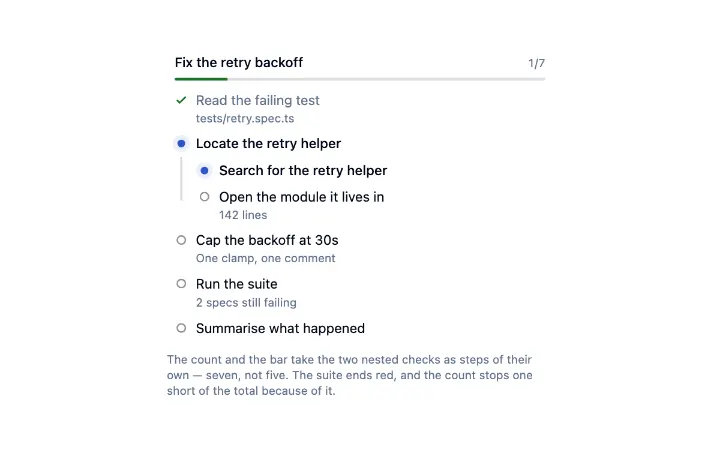
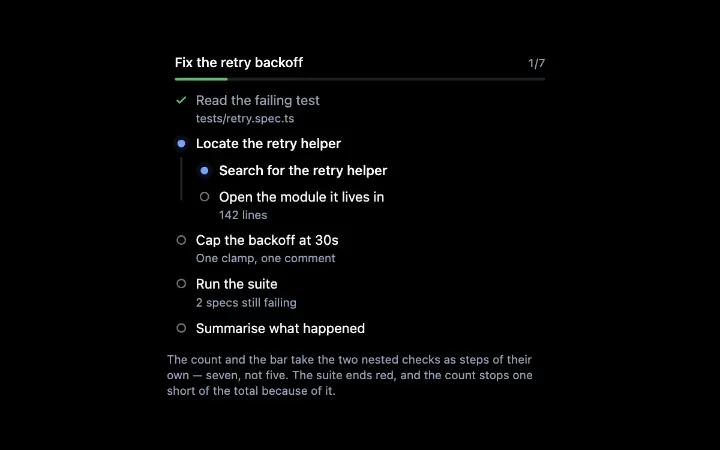
AgentPlan
Glanceable checklist of an agent's plan: a done/total count and completion bar over one row per step, with a status glyph, an optional detail line, and substeps indented under a rail
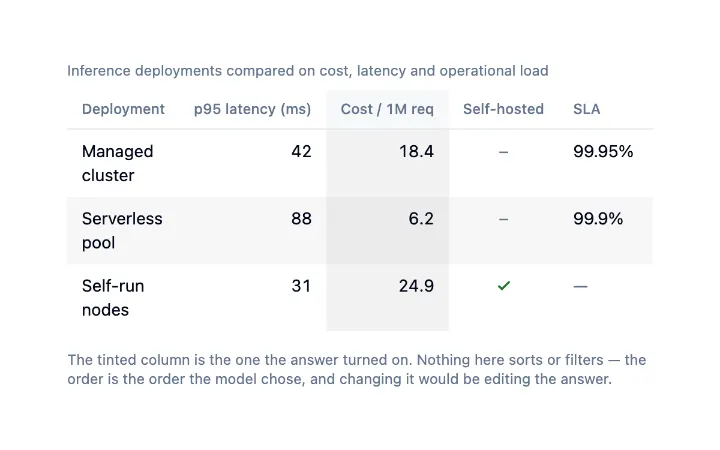
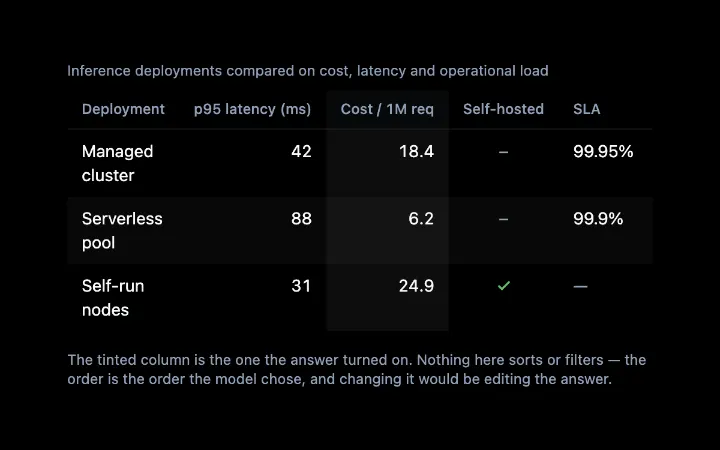
AiDataTable
Compact comparison table for a model's structured answer: real table semantics, tabular numeric columns, check-or-dash booleans, and one tintable column — rendered in the order it arrived, with no sorting
ApprovalCard
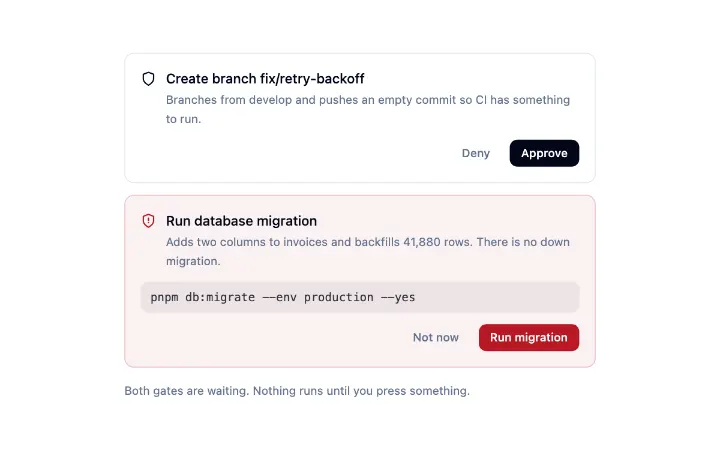
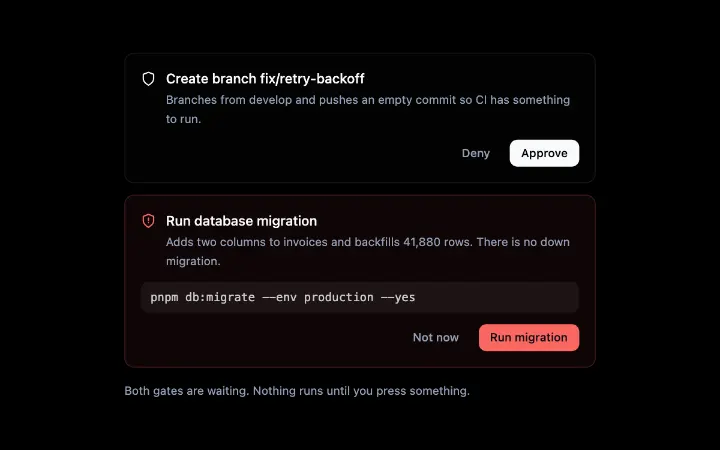
A human-in-the-loop gate before a side effect: the agent states what it is about to do, and the footer swaps its approve and deny buttons for a one-line verdict once someone decides