 FANCYUI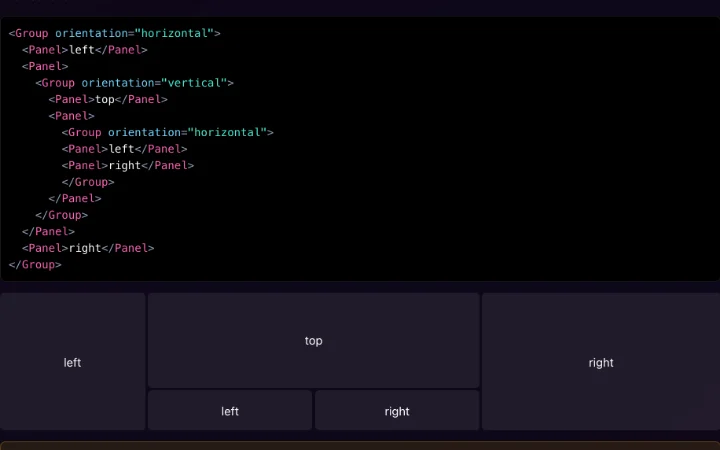
Panels — nested resize
Drag the gaps between nested panels; where gaps meet, both directions resize at once.
Related FancyUI components
- Type
- Interaction
- Interaction
- Drag
- Style
- Minimal
- Framework of source
- React
- Code availability
- Open source
Why it works
Groups nest horizontally and vertically, and the gap between two panels is the handle: the cursor turns to a resize arrow on hover and the neighbours trade size as you drag. Near an intersection, one drag moves the column and the row together. The example prints the markup above the live layout, so structure and result sit side by side.
When to use it
Editors, dashboards and inspectors where the visitor decides how much room each pane gets.
Things to watch
Handles need a keyboard path (focus plus arrow keys) and a visible focus ring. Thin gaps are hard targets on touch; widen the hit area, not the visible line. Persist sizes so a reload does not undo the layout.
Implementation clues
- sizes as percentages of the group
- pointer capture on the gap
- intersection hit test
- min and max per panel
Related
- FANCYUI
 OPEN SOURCE
  FANCYUI